How to Build a Business Website With AI in 10 Minutes
Describe your business, let Bloq AI write the first draft, fix what it got wrong and publish. Every button to press, plus what it costs.

Nkosinathi Mbokazi, Founder of Bloqpage
November 14, 20267 min read
You can have a working business website in about ten minutes: sign up, describe your business to Bloq AI, let it write the first draft, swap in your own photos and contact details, then press Publish Live. This guide walks through each step in Bloqpage and the few minutes of checking that make the difference between a draft and a site you are happy to share.
What do you need before you start?
Three things, all of which you probably have on your phone already:
- A few lines about your business. What you do, who it is for and where you work. "Mobile dog grooming in Durban North, for busy owners who cannot get to a salon" is plenty.
- Your contact details. The phone number, WhatsApp number and email address customers should use.
- Five or six photos. Your work, your shop, your team or your products. Bloq AI adds free stock photos where you have none, but your own pictures sell better.
You do not need a domain name yet. Every site gets a free address at yourname.bloq.page, and you can connect your own domain later.
Step 1: Create your site
Sign up and your workspace is ready. Every new account gets 14 days of Pro features free, with no card needed.
On the dashboard, press New site, type a name and press Create Website. The builder opens on your new home page.
Step 2: Describe your business to Bloq AI
Open Bloq AI on the left of the builder and write a short brief. The more specific you are, the less you fix later. A good brief covers:
- What you sell or do
- Who your best customers are
- What the page should cover: services, prices, reviews, opening hours, a contact form
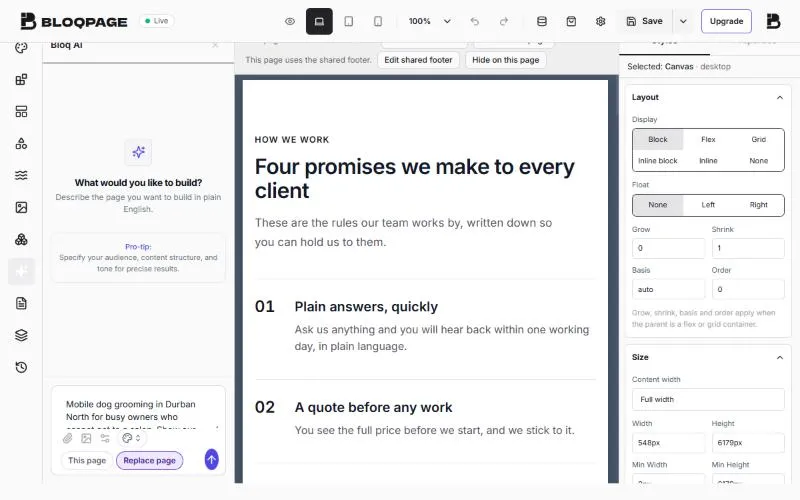 The Bloq AI panel in the Bloqpage builder with a short brief for a mobile dog grooming business typed in
Pick a style from the palette button, or leave Surprise me and Bloq AI chooses one. Press send.
Bloq AI writes the copy, picks the sections and finds photos. Everything it adds is a normal block, so you can change any word or picture afterwards.
Selling online or writing a blog? Say so in the brief. Bloq AI will suggest a matching store or blog template instead of building from scratch, because those designs come with a working shop or post list.
What makes a good brief?
The brief is the single biggest difference between a draft you can publish after small edits and one you rewrite. Compare these two:
| Weak brief | Strong brief |
|---|---|
| A website for my salon | A hair salon in Soweto for women who want braids and natural hair care. Show our services with prices from R250, our opening hours (Tuesday to Saturday), five reviews and a WhatsApp booking button |
| Plumbing company | Emergency plumber in Pretoria East, same-day callouts, seven days a week. Cover geysers, burst pipes and blocked drains, the suburbs we serve, and a quote form |
| An online shop for candles | Hand-poured soy candles made in Durban, sold online with nationwide delivery. Show best sellers, gift sets, scent notes and our story |
The strong briefs answer four questions: what you do, for whom, where, and what the visitor should do next. You do not need perfect sentences. Bloq AI turns notes into copy.
Step 3: Fix what the AI got wrong
AI drafts are quick, and they are also confident about things they cannot know. Read the page once from top to bottom and check:
- Prices and opening hours. Bloq AI writes sensible examples, so replace every one with your real numbers.
- Claims. Remove anything you cannot back up, such as "award-winning" or "20 years' experience".
- Contact details. Click each button and choose where it goes: a page on your site, a section of this page or a web address.
- Photos. Click a picture and pick your own from Assets, or a better one from Unsplash. Fill in the image description, which screen readers and Google both use.
To change a whole section, select it and choose Edit with AI in its toolbar. Describe the change in plain words ("shorter, and mention we work weekends"), check the suggested edit, then press Apply.
What if the draft is not what you wanted?
You have three ways to fix it, from smallest to biggest:
- Edit one section with AI. Select it, choose Edit with AI and say exactly what is wrong: "Too formal. Write it like you are talking to a friend" or "Add our three prices: R350, R450 and R600".
- Replace a section by hand. Delete it and drag in a different one from Blocks. Every block takes your site's colours and fonts automatically.
- Start the page again with a better brief. If the whole page misses, it is usually the brief. Add who the page is for and what the visitor should do, and run it again.
Keep an eye on your AI credits while you experiment. Every plan includes a monthly amount, listed below.
Step 4: Check it on a phone
Most of your visitors will arrive on a phone. Use Desktop, Tablet and Mobile at the top of the builder to see each screen size. If a block looks crowded on a phone, select it, open Styles and switch to Mobile to change its size or spacing for phones only.
Press Preview to see the page on its own, without the builder around it.
Step 5: Add the page title and description Google shows
Open Project Settings, then Page Metadata. Fill in:
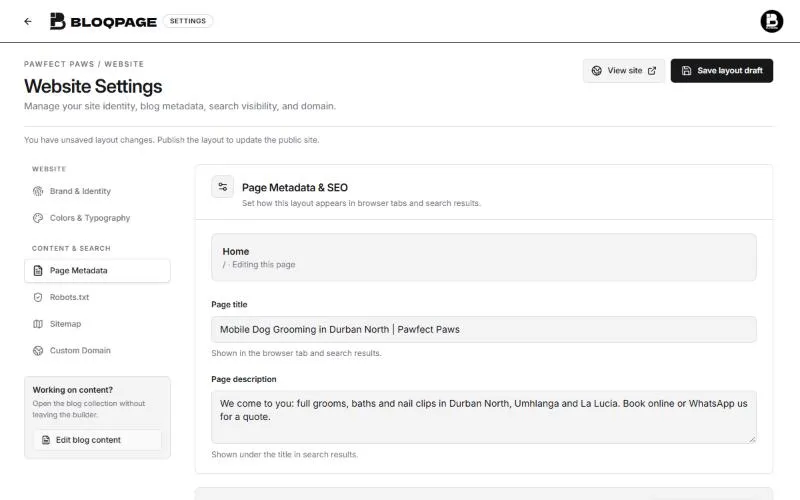 The Page Metadata settings in Bloqpage with a page title and a page description filled in for a dog grooming business
- Page title: under 60 characters, with what you do and where. "Mobile Dog Grooming in Durban North | Pawfect Paws".
- Page description: one or two sentences that make someone want to click. This is the grey text under your link in Google.
Our checklist for getting found on Google covers the next steps once you are live.
Step 6: Publish
Open the arrow next to Save and choose Publish Live. The label at the top changes from Draft to Live. Click your site's address to open it and share the link.
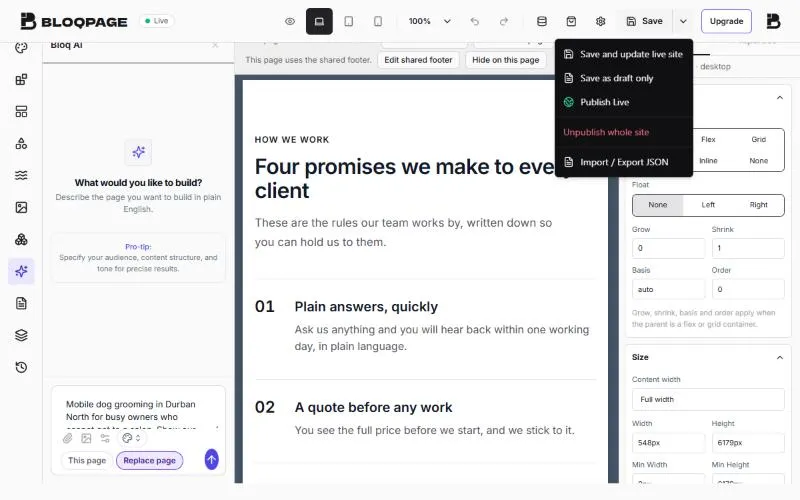 The menu next to Save in the Bloqpage builder, showing Save and update live site, Save as draft only and Publish Live
From now on, Save updates the live site straight away. Choose Save as draft only when you want to keep a change private until you publish again.
What should you do in your first week?
A published site is the start. These five jobs make it work for you:
- Share the link with your existing customers on WhatsApp, Instagram and Facebook.
- Add the address to your Google Business Profile, so people who find you on Maps can click through.
- Ask two or three customers for a review and add the best lines to your homepage.
- Connect your own domain when you are ready, such as
pawfectpaws.co.za. It looks more trustworthy and is easier to remember. - Check your contact form by sending yourself a test message from the live site.
How much does it cost?
The first 14 days cost nothing and need no card. After that, plans in South Africa start at R149 a month for Basic, which includes one website, a custom domain and the online store. Pro is R399 a month and adds better AI, analytics and up to five team members. Paying yearly costs the same as ten months. Prices in US dollars and the full comparison are on the pricing page.
Common questions
Do I need to know how to code?
No. You build by dragging ready-made sections onto the page and typing over the words. Bloq AI writes the first draft if you would rather not start from a blank page.
Can I change the design after Bloq AI builds it?
Yes. Every section it adds is a normal block. Change the text, colours, spacing and photos, delete sections or drag in new ones from Blocks.
How many times can I use Bloq AI?
Each plan comes with monthly AI credits: 100 on Basic, 400 on Pro and 1,200 on Business. You can also connect your own OpenAI or Claude key.
Can I add a shop or a contact form later?
Yes. Add a form from Blocks, then Forms, and the messages land in your dashboard. For a shop, start from one of the store templates, which come with products, a cart and checkout through Paystack, PayFast or PayPal.
Ready to try it? Start your free 14-day trial and have a draft on screen before your coffee gets cold.