How to Get Your Business Found on Google: A Free Checklist
Twelve free steps that get a small business website and its Google listing showing up for local searches, in the order that pays off fastest.

Nkosinathi Mbokazi, Founder of Bloqpage
November 14, 20267 min read
To get your business found on Google, claim your free Google Business Profile, give every page of your website a clear title and description that say what you do and where, tell Google about your site in Search Console, and keep adding pages that answer what your customers search for. The checklist below covers each step in the order that pays off fastest, and none of it costs money.
How does Google decide who shows up?
For a search like "plumber in Pretoria East", Google shows two kinds of results: the map with three local businesses, and the list of websites underneath. The map comes from Google Business Profiles. The list comes from websites. You want to be in both, and each one helps the other.
Google looks at three things for local searches: how well you match what was searched, how close you are, and how well known you are, which includes reviews and other sites linking to you. You control the first and third more than you might think.
Part 1: Your Google Business Profile
1. Claim your profile
Go to Google Business Profile, search for your business and claim it, or create it if it is not there. Google verifies that you own it, usually by phone, email or a short video of your premises.
2. Fill in every field
Choose the most specific main category ("Wedding photographer", not "Photographer"), then add your hours, phone number, service area, and a short description in plain words. Add your website address so people can click through.
3. Add real photos
Upload photos of your work, premises and team, and add a few new ones each month so the profile looks active.
4. Ask for reviews and reply to every one
After a good job, send customers the review link from your profile. Reply to every review, the bad ones too, politely and with your business name in the reply.
Part 2: Your website
5. Give every page its own title and description
The title is the blue link in Google and the description is the grey text under it. Write both for people, with what you do and where:
- Title: "Emergency Plumber in Pretoria East | Same-Day Callouts"
- Description: "Burst geyser or blocked drain? We are in Pretoria East within the hour, seven days a week. Call or WhatsApp for a quote."
In Bloqpage, open Project Settings, then Page Metadata, for each page.
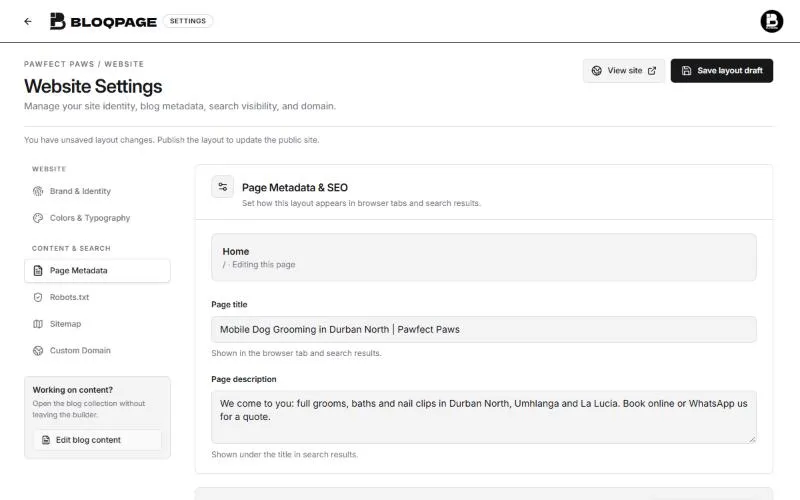 Page title and page description fields in Bloqpage's Page Metadata settings, filled in for a local business
6. Use one main heading per page that says what the page is about
Each page should have one main heading, then smaller headings that break the page up. Write them as your customers would search: "Geyser replacement in Pretoria" works better than "Our Solutions".
7. Say where you work, in words
Google reads text, so mention your suburbs, city and service area on the page, and put your address and phone number in the footer. A map picture alone does not tell Google where you are.
8. Describe your photos
Every image has a description field. Write what is in the picture ("New solar geyser installed on a roof in Moreleta Park"). It helps people using screen readers and gives Google more to go on. In the Bloqpage builder, click a picture and fill in the image description in Properties.
9. Make sure the site works on a phone and loads fast
Most local searches happen on phones. Check every page in the builder's Mobile view, keep photos to a sensible size, and remove sections nobody needs.
Part 3: Tell Google about your site
10. Use your own domain
A domain such as yourbusiness.co.za is easier to remember, looks more trustworthy in results, and lets you verify the site in Search Console. Basic and Pro include one custom domain. Connect it under Project Settings, then Custom Domain.
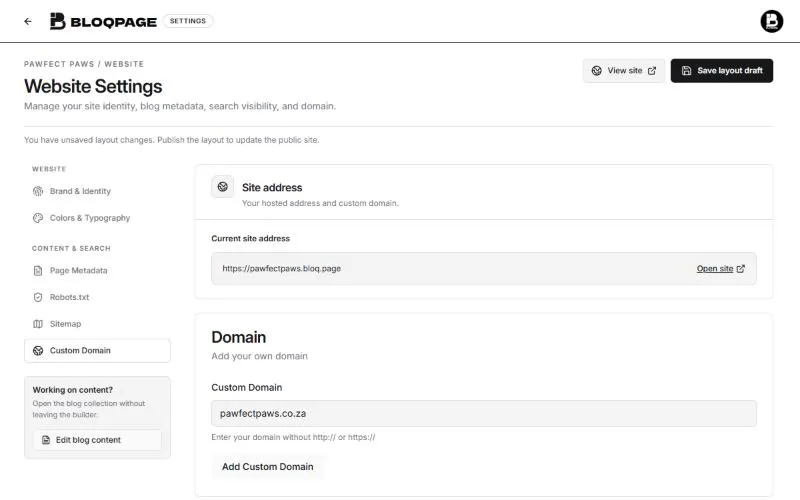 The Custom Domain settings in Bloqpage with a .co.za domain typed in, ready to add
11. Add your site to Google Search Console
Search Console is Google's free tool that shows which searches bring people to your site. Add your domain as a property and verify it with the TXT record Google gives you, at the company where your domain's DNS is managed. Then submit your sitemap, which Bloqpage creates for you at yourdomain.co.za/sitemap.xml. You can open it from Project Settings, then Sitemap.
12. Keep adding useful pages
Each page you add is another way to be found. Good pages for a small business answer real questions: what a service costs, how long it takes, what to do before you call. A blog is the easiest place to keep adding them, and one helpful post a month beats ten rushed ones.
What mistakes keep small businesses off Google?
These come up again and again when a business says "Google cannot find us":
- Every page has the same title. If your home, services and contact pages are all called "Home | Business Name", Google cannot tell which one answers a search. Give each page its own title.
- The town is only in a picture. A banner image that says "Serving Durban North" means nothing to Google. Put your area in the text, the footer and the page title.
- Different details everywhere. Your phone number, address and business name should match exactly on your website, your Google Business Profile and directories such as Facebook. Mixed details make Google less sure you are one business.
- A site that is still on a free subdomain. It works, but a
.co.zaaddress you own builds trust and lets you verify the site in Search Console. - No new pages for months. A site that never changes gives Google little reason to come back. One useful page or post a month is enough to keep it moving.
- Asking for reviews only once. Reviews keep counting. Make asking part of every finished job.
A worked example
Take a made-up example: a mobile dog groomer in Durban North whose site has one page called "Home" and whose Google listing has no website link. In an afternoon, the owner could:
- Claim the Google Business Profile, choose "Pet groomer" as the category and add a dozen photos of real work.
- Split the site into three pages: Home, Services and prices, and Areas we cover, each with its own title such as "Dog Grooming Prices in Durban North | Pawfect Paws".
- Write the suburbs covered on the Areas page: Durban North, Umhlanga, La Lucia and Glenashley.
- Connect
pawfectpaws.co.za, add it to Search Console and submit the sitemap. - Send the last ten customers the review link from the profile.
None of this costs money. The difference is that Google now has clear pages to match to searches like "dog groomer Umhlanga", and people who find the business on Maps can click through to prices and book.
How long does it take?
A complete Google Business Profile can start showing in the map within days of being verified. A new website usually takes weeks to a few months to climb for competitive searches, faster for specific ones such as "mobile dog groomer in Durban North". Search Console shows you the searches you already appear for, so you can see progress long before the phone starts ringing.
Common questions
Do I need to pay for SEO?
Not to get started. Everything in this checklist is free. Paid help makes sense later, when you compete for busy searches in a big city.
Is a Facebook page enough?
It helps, but you do not control how Facebook shows your business, and most of what you post there stays out of Google. A website on your own domain is yours, and every page on it can bring in searches.
Does Bloqpage do SEO for me?
Bloqpage handles the technical side: a sitemap, fast pages that work on phones, and fields for page titles, descriptions and image descriptions. The words that match what your customers search for still come from you, and our guide to building a site with AI shows how to get a strong first draft quickly.
Want a site Google can find? Start your free 14-day trial and publish your first page today.