How to Register a .co.za Domain and Connect It to Your Website
Choose a name, register a .co.za for about R109 a year, connect it to your website without breaking your email, and fix the common problems.

Nkosinathi Mbokazi, Founder of Bloqpage
November 18, 20267 min read
To get a .co.za domain, search for your name at an accredited South African registrar, register it in your own name for about R109 a year, then point it at your website by adding one DNS record. Most domains connect within minutes to a few hours. This guide covers choosing the name, registering it, connecting it to Bloqpage, keeping your email working, and fixing the problems people run into.
Why use a .co.za domain?
A domain such as yourbusiness.co.za is the address people type to find you, and the part of your email after the @. A .co.za tells South African customers you are local, which matters when they are deciding whether to trust a shop or call a plumber. It is also cheap to keep, and it is yours: if you ever move your website, the address comes with you.
Your website works without one. Every Bloqpage site has a free address such as yourname.bloq.page. A domain of your own makes it easier to remember, looks more professional on a business card, and lets you verify your site in Google Search Console.
How do you choose a good domain name?
Good domain names are short, easy to say on the phone and easy to spell after hearing them once. Before you register, check your idea against these:
- Use your business name if it is free.
pawfectpaws.co.zabeatsbest-dog-grooming-durban.co.za. - Avoid hyphens and numbers. People forget them or type them wrong. "Is that a dash or the word?" costs you visitors.
- Keep it short. Under 15 characters before the
.co.zais a good target. - Say it out loud. If you have to spell it every time, choose another.
- Check you are allowed to use it. Do not register a name that copies another business or brand. If you have a registered company, using its name keeps things simple.
Should you also get the .com? If it is free and cheap, registering both stops someone else taking it. Point the second one at the same site, or simply keep it parked.
Step 1: Check if the name is free
Search for your name on any accredited registrar's website. South African registrars include 1-grid, Domains.co.za, xneelo and Afrihost, among many others. If the name is taken, try a short variation, or add your town ("pawfectpawsdurban.co.za").
Step 2: Register it in your own name
Any accredited registrar can register a .co.za for you. You do not need a registered company: individuals and sole traders can register one, and the owner does not even need to live in South Africa.
What it costs: after a registry price change on 1 October 2026, .co.za registration and renewal costs about R109 a year including VAT at registrars such as 1-grid. Prices vary between registrars, so compare the renewal price, not just the first year.
Most important: make sure you are listed as the owner (the registrant), with your own email address. Many businesses discover years later that a web designer registered the domain in their own name and has since disappeared. If someone else registers it for you, ask them to put it in your name from day one.
Turn on auto-renew. A domain that lapses can be registered by someone else.
Step 3: Connect the domain to your website
On Bloqpage, custom domains come with every paid plan: Basic and Pro include one, and Business includes five.
- In the builder, open Project Settings, then Custom Domain.
- Type your domain without
https://, for examplepawfectpaws.co.za, and press Add Custom Domain. - Bloqpage shows the one record to add: an A record for a main domain such as
pawfectpaws.co.za, or a CNAME for a subdomain such aswwworshop. - Sign in where your domain's DNS is managed, usually your registrar, and add that record. If a record with the same name already exists, change it instead of adding a second one.
- Wait for the green tick in Custom Domain, then open your domain to check.
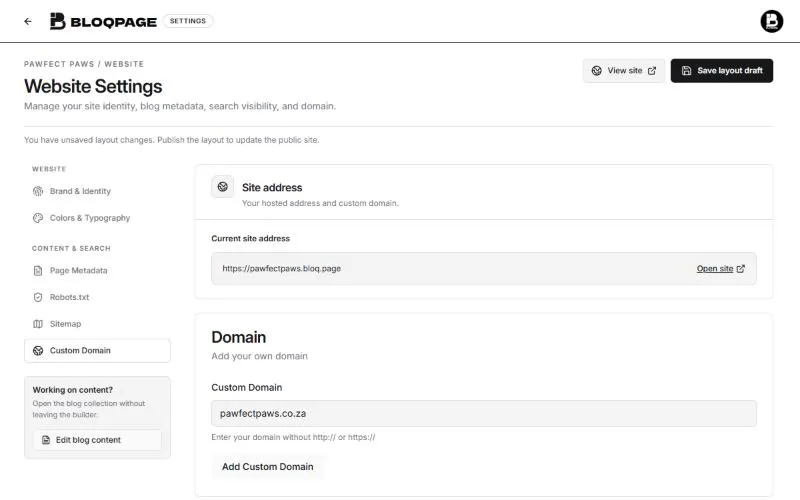 The Custom Domain settings in Bloqpage, with the free bloq.page address shown and a .co.za domain typed in, ready to add
Where is my DNS managed? Usually at the registrar where you bought the domain. If your registrar shows nameservers that belong to another company, such as Cloudflare, the DNS is managed there instead. Add the record wherever the nameservers point.
Using Cloudflare? Set the record to DNS only (the grey cloud), not proxied.
Step 4: Keep your email working
This is where most domain changes go wrong. Your email on this domain depends on separate records called MX and TXT records. Connecting your website only needs the one record Bloqpage shows you.
- Do not change your nameservers to connect the website. Changing nameservers replaces all your records, including email.
- Do not delete MX or TXT records while you tidy up.
- Need email on your new domain? Most registrars sell mailboxes, or you can use a service such as Google Workspace or Microsoft 365. They give you their own MX and TXT records to add, separately from your website.
How long does it take?
Usually a few minutes to a few hours. DNS changes spread as computers around the internet refresh their saved copy of your records, which depends on a setting called TTL (time to live). If the old record had a long TTL, some visitors may see the old site for up to a day.
Planning a move from an existing website? A day before, set the record's TTL to 300 seconds (five minutes) at your DNS host. The switch then happens within minutes for almost everyone.
Moving from an old website without downtime
- Build your new site on Bloqpage while the old one stays live at your domain.
- Check the new site on its free
bloq.pageaddress on a phone and a computer. - Add your domain in Custom Domain and change only the record Bloqpage shows.
- Visitors start seeing the new site as the change spreads, and the old one simply stops being used.
- Cancel the old hosting only after the green tick shows and your email still works.
What if it does not work?
| What you see | Most likely cause | Fix |
|---|---|---|
| The old website still shows | The change has not spread yet, or an old record is still there | Wait an hour, and check there is only one record with that name |
| "Site not found" or a security warning | The record points somewhere else, or there are two conflicting records | Compare the value with the one in Custom Domain exactly |
www works but the main domain does not, or the other way round | Only one of the two addresses is connected | Connect the address you want people to use, and promote that one |
| Email stopped arriving | MX records were changed or the nameservers were moved | Put the original MX and TXT records back, then add only the website record |
| Cloudflare shows an error | The record is proxied (orange cloud) | Set it to DNS only (grey cloud) |
Still stuck? Our help centre covers domains too, and email support is free on every plan.
Common questions
Should I use .co.za or .com?
For a business that mainly serves South Africans, .co.za signals that you are local and is usually cheaper. If you sell internationally, a .com can make sense. Many businesses register both and point one at the other.
Should my address use www?
It makes no difference to Google. Pick one form, use it everywhere (on your business card, Google Business Profile and social pages), and stick to it.
Can I move my domain to another registrar later?
Yes. You can transfer a .co.za between accredited registrars. Ask your new registrar how; they will guide you through approving the move.
Does a domain remove the Bloqpage branding?
On paid plans, the Bloqpage branding is removed on your custom domain. See what each plan includes.
Ready to give your business its own address? Start your free 14-day trial, build your site, and connect your domain when you choose a plan. Our checklist for getting found on Google shows what to do once it is live.
Sources
Checked on 14 November 2026. Prices and registry rules change, so confirm with your registrar.