How to Start an Online Store in South Africa (2026 Guide)
From the rules you must follow to payments, courier delivery and your first orders: a step-by-step guide to opening an online shop in South Africa.

Nkosinathi Mbokazi, Founder of Bloqpage
November 16, 20267 min read
To start an online store in South Africa, decide what you will sell, put the legally required details on your site, choose a payment provider such as Paystack or PayFast, set up courier delivery, build the shop from a store template, test a real order, then tell your first customers. You can do all of it in a weekend and for under R2,000 in the first year, before payment fees.
This guide takes each step in order. It is general information, not legal or tax advice, so check anything you are unsure about with an accountant.
Step 1: Decide what you will sell and to whom
Before you build anything, write down three things:
- Your products and prices. Start small. Ten good products with clear photos sell better than a hundred average ones.
- Who buys them. Locals in your town, customers across South Africa, or buyers overseas. This decides how you get paid and how you deliver.
- Your margin after costs. Price in the payment fee (about 3% on cards), packaging and delivery, so every sale makes money.
Step 2: Get the rules right from day one
You do not need a registered company to sell online. Many shops start as a sole proprietor and register later. If you want a private company, registering one through the government's BizPortal costs about R125, or R175 with a name reservation, according to 2026 registration guides.
What every online shop must do:
- Show the required details. South Africa's Electronic Communications and Transactions Act (ECTA) says an online seller must show customers key information before they pay, including the full price, delivery costs and timing, and the returns and refund policy, along with your business name and contact details.
- Allow a 7-day cooling-off period. Under ECTA section 44, a customer may cancel most online purchases within seven days of receiving the goods, without a reason, paying only the cost of sending them back. Some items, such as goods made to order, are excluded.
- Protect customer data. The Protection of Personal Information Act (POPIA) means you need a privacy policy that says what you collect and why.
- Know when VAT starts. Registering for VAT is compulsory once your sales pass R2.3 million in 12 months, a threshold that rose from R1 million on 1 April 2026. You may register voluntarily from R120,000.
In practice, add three short pages to your shop: Delivery, Returns and refunds, and Privacy, and link them in your footer.
Step 3: Choose how customers will pay
South African shops mostly use one of these:
- Paystack: the lowest published card fee, 2.9% plus R1 per local card payment.
- PayFast: more ways to pay, including instant EFT, Capitec Pay, SnapScan and pay-later options.
- PayPal: for customers outside South Africa, paid in US dollars.
Our Paystack vs PayFast vs PayPal comparison goes through fees, payouts and who each suits. Many shops offer two and let customers choose.
Step 4: Plan delivery before you list products
Delivery is where small shops lose money, so decide this early.
- Courier to the door: services such as The Courier Guy, RAM and SkyNet collect from you and deliver nationwide.
- Pickup points: Pargo lets customers collect from a nearby store, which is often cheaper for them.
- Local delivery or collection: for customers in your area, offer free pickup or a flat local rate.
A shipping platform such as Bob Go compares rates from several couriers in one place, without a separate account with each, prints waybills and gives you tracking numbers. Its pay-as-you-go option has no monthly fee, and you pay the courier rate per parcel.
Weigh and measure your typical parcel before you set prices. A box that is slightly too big can cost more to send than a small, heavy one.
Step 5: Build the shop
With Bloqpage:
-
Start from a store template. Pick one on the templates page, press Live demo to try it, then Use this template. It comes with the shop, product pages, cart and checkout already built.
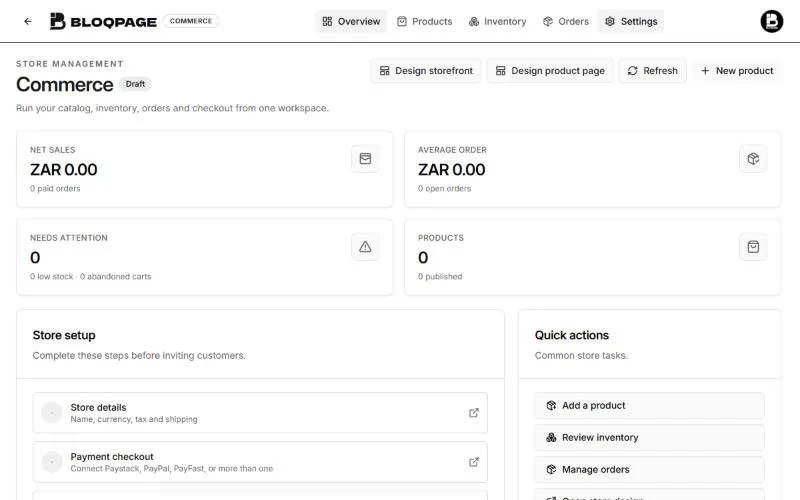 The Commerce overview in Bloqpage, with sales figures and a store setup checklist for store details and payment checkout
-
Add your products. Open Commerce at the top of the builder. Under Products, add a category, then press New product. Give it a title, photos, price and stock, and add options such as size or colour. Press Create draft, then publish it when it is ready to sell.
-
Connect payments. In Commerce, open Settings and scroll to Payments & shipping. Connect Paystack, PayFast or PayPal with the keys from your provider's dashboard. Start in test mode.
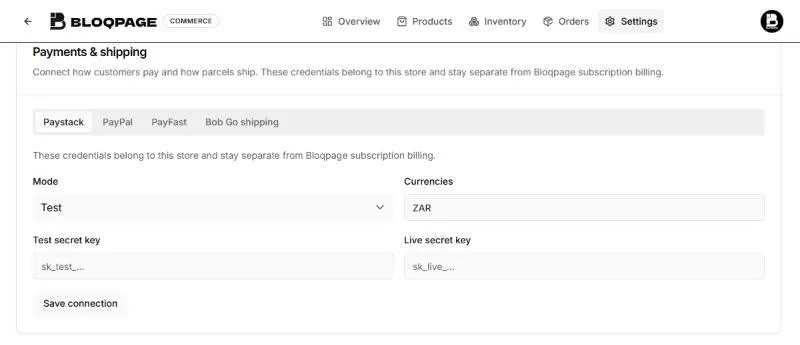 The Payments and shipping settings in Bloqpage Commerce, with tabs for Paystack, PayPal, PayFast and Bob Go shipping and the mode set to Test
-
Set delivery. In the same card, set a flat shipping price, free shipping above an amount, and local pickup if you offer it. For live courier rates at checkout, connect Bob Go and add your collection address.
-
Make discount codes for launch, such as 10% off a first order, to give your first customers a reason to buy now.
-
Fill in the policy pages from Step 2 and link them in the footer.
The online store is included on every Bloqpage plan, and Bloqpage takes no fee from your sales.
What makes a product page sell?
Most first shops lose sales on the product page, not the checkout. Before you publish each product, check:
- Photos in daylight on a plain background. Show the product from three angles, one photo in use, and one with something for scale. A phone camera by a window is enough.
- A title people would search for. "Lavender soy candle, 200 g" beats "Calm". Add the size, colour or scent.
- A description that answers questions. What it is made of, how big it is, how long it lasts, how to care for it, and when it will arrive.
- The delivery cost before checkout. Unexpected extra costs at checkout are one of the most common reasons shoppers leave a cart. State your delivery prices on the product page or in a short banner.
- Stock that is real. Set stock levels so you never sell something you cannot send, and turn on options such as size and colour so each one tracks its own stock.
Start with your ten best products done properly, then add more as orders come in.
Step 6: Test with a real order
Before you tell anyone, place an order yourself in test mode:
- Add a product with options to the cart and use a discount code
- Check that the delivery price is right for a nearby and a far address
- Pay with the provider's test card and confirm the order appears under Orders
- Check the order email you and the customer receive
Then switch to live keys, press Save store, then Publish store, and publish your site. Place one small real order and refund it to be sure money flows end to end.
Step 7: Get your first orders
New shops do not get found on Google straight away, so start with the people who already know you:
- Tell your existing customers and followers. Share the shop link on WhatsApp status, Instagram and Facebook with your launch discount.
- Add a WhatsApp chat button so shoppers can ask questions before they buy.
- Set up your Google Business Profile with your shop link. Our checklist for getting found on Google covers it step by step.
- Ask your first buyers for a review, and reply to every message quickly. Early trust sells the next order.
How much does it cost to start?
On Bloqpage Basic, paid yearly, the first year costs R1,490 for the plan plus about R109 for a .co.za domain, so about R1,600 before payment fees. Monthly, Basic is R149 a month. Payment fees and courier costs depend on your sales. Our guide to what a website costs in South Africa works through a full first year for a small shop.
Common questions
Do I need a business bank account?
Payment providers pay out to a South African bank account in your name or your business's name. A separate account makes bookkeeping much easier, even as a sole proprietor.
Can I sell to customers outside South Africa?
Yes. Price those products in US dollars and take payment through PayPal, and check courier rates for international delivery before you promise it.
What should I sell first?
Whatever you already sell offline or to friends. A shop works best when it gives existing demand an easy way to buy, then grows from there.
Ready to open your shop? Start your free 14-day trial, pick a store template, and have your first products online today. Compare what each plan includes first if you like.
Sources
Checked on 14 November 2026. Rules and fees change, so confirm with each source before you rely on them.