Shipping
Bloqpage and Bob Go
Connect your own Bob Go account and customers see real courier prices for their address at checkout. Paid orders go to Bob Go with the courier they chose, and tracking updates reach the order and the customer's inbox.
Every Pro feature free for 14 days. No card needed.
What it does
Live courier rates at checkout
For a South African address, the store asks Bob Go for rates based on each product's packed size and weight, and shows the delivery options from your Bob Go account, with their price and expected delivery dates, next to your own.
The price shown is the price charged
The rate is checked again on the server when the customer pays, so the delivery charge always matches what Bob Go quoted.
Paid orders sent to Bob Go
Once payment is confirmed, the order goes to your Bob Go account with the customer's details, address, items, weights and the courier they picked. If sending fails, you can resend it from the order.
Tracking to the order and the customer
When a courier collects and moves the parcel, Bob Go tells the store. The order is marked fulfilled, the tracking link is saved, and the customer gets one email with it.
Never stuck at checkout
If Bob Go has no rate for an address, or is unreachable, your own flat or zone delivery price is used instead, and free delivery and collection still show.
Test in Bob Go's sandbox
Connect a sandbox key while you set up: nothing real is booked or charged. Switch to your live key when you are ready.
How to set it up
- In Bob Go, open Settings, then API keys, and copy your API key. Use a sandbox account while you test.
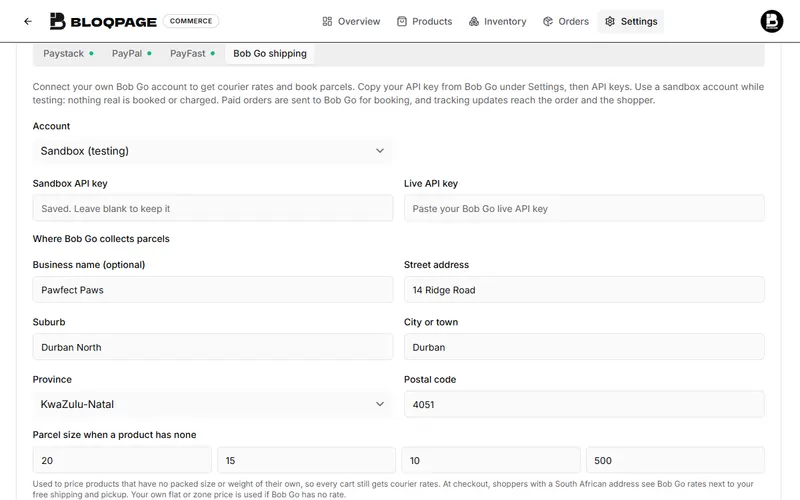
- In Bloqpage, open your store in the dashboard, choose Settings, and under Payments & shipping choose the Bob Go shipping tab.
- Paste the key, add the address Bob Go collects parcels from, and set a default parcel size and weight for products that have none.
- Add the packed size and weight to your products, so the rates match what you send.
- Place a test order with a South African address and pick a courier. The order appears in your Bob Go account, ready to book.
What it costs
- Bloqpage: the online store and the Bob Go connection are in every plan, from Basic at R149 a month.
- Bob Go: its pricing page lists pay as you go with no monthly fee, and paid plans from R249 to R1,999 per month excl. VAT with lower courier rates. Courier charges for each parcel are billed by Bob Go.
- Check with Bob Go which of its plans suits your volume and includes API access.
Good to know
- Courier rates show for South African addresses on stores priced in rand.
- You still book the shipment and print the waybill in Bob Go. The order arrives there with the courier the customer chose.
- Bob Go needs a collection address set up in your Bob Go account before you can fulfil.
- Each store connects its own Bob Go account with its own API key.
Questions
Do I need my own Bob Go account?
Yes. Each store connects its own Bob Go account, so parcels and courier charges are between you and Bob Go.
What if a product has no size or weight?
The store uses the default parcel size and weight you set on the Bob Go shipping tab, so every cart still gets a rate.
Can I still offer free delivery and collection?
Yes. Your free delivery threshold and collection option show at checkout next to the Bob Go courier rates.
Does the customer get tracking?
Yes. When the courier moves the parcel, the customer receives one email with the tracking link, and the order is marked fulfilled.
Who do I contact if an order does not reach Bob Go?
Open the order and press resend first. If it still fails, email support@bloqpage.com with the order number. For courier, waybill or billing questions, contact Bob Go.
Support
Questions about the Bob Go connection in Bloqpage: email support@bloqpage.com. It is free on every plan. Questions about your Bob Go account, fees or payouts go to Bob Go.
Keep reading
Sources
Checked on 20 November 2026. Bob Go sets its own fees and plans, so check its pages before you decide.
Open a store with Bob Go ready to connect
Start from a store template or let Bloq AI write your first draft, connect Bob Go in the store settings, and publish on yourname.bloq.page today.