Payments
Bloqpage and Paystack
Connect your own Paystack account and your customers pay by card or bank on Paystack's secure checkout. Built into every Bloqpage store, with no plugin and no fee from Bloqpage on your sales.
Every Pro feature free for 14 days. No card needed.
What it does
Paystack at checkout
Customers choose "Card or bank payment" and press "Continue to secure payment". They pay on Paystack's checkout with the methods your Paystack account offers, then come back to their order.
Your account, your money
Each store connects its own Paystack account with its own secret keys. Payments settle with Paystack and go to you. Bloqpage never holds the money and adds no fee on sales.
Orders marked paid only when Paystack confirms
The store checks every payment with Paystack before an order turns Paid, and it only accepts webhooks signed with your secret key.
Refunds from the order screen
Refund all or part of a payment from the order in your dashboard. It goes through Paystack's refunds service, and the order updates when Paystack finishes it.
Test mode first, then live
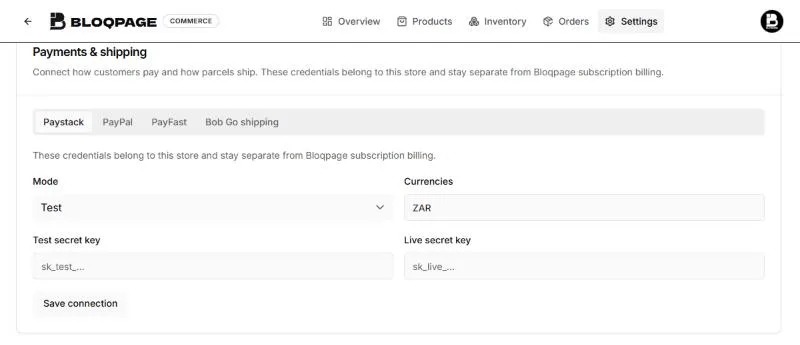
A Test and Live switch with separate secret keys, so you can place test orders with Paystack's test cards before taking real money.
Several currencies
Paystack works for stores priced in rand, naira, cedi, shilling, CFA franc or US dollars, as long as your Paystack account takes that currency.
How to set it up
- In your Paystack dashboard, open Settings, then API Keys & Webhooks, and copy your test secret key and live secret key.
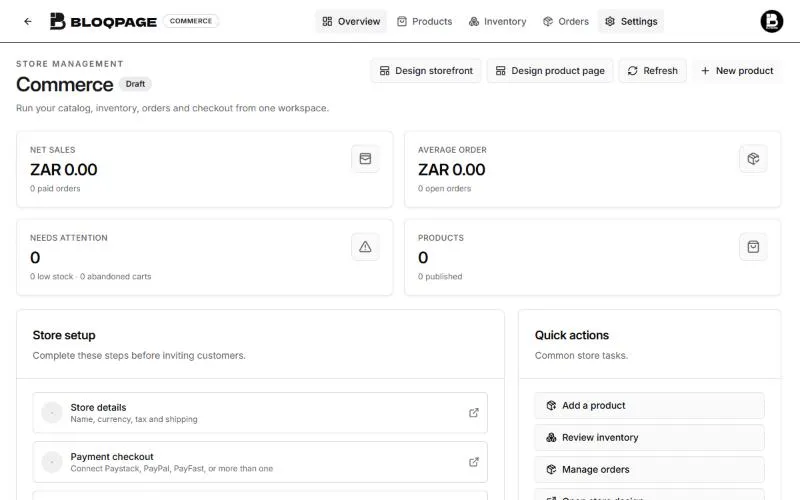
- In Bloqpage, open your store in the dashboard, choose Settings, and under Payments & shipping choose the Paystack tab.
- Leave Mode on Test, paste both secret keys, check the currencies and press Save connection.
- Copy the Merchant webhook URL that appears and paste it into the Webhook URL box in Paystack, in the same mode.
- Place a test order with a Paystack test card. When it works, switch Mode to Live, save again and add the webhook URL to your live settings in Paystack.
What it costs
- Bloqpage: the online store is in every plan, from Basic at R149 a month. Bloqpage adds no fee on your sales.
- Paystack: charges its own fee per transaction, which depends on the country and how the customer pays. See Paystack's pricing page for the current rates.
- Every Bloqpage account starts with a free 14-day trial of Pro, so you can connect Paystack in test mode and try checkout before you pay anything.
Good to know
- Paystack shows at checkout only when the store's currency is one your Paystack account takes.
- Each store connects its own Paystack account; there is no shared Bloqpage account.
- Recurring payments and subscriptions through Paystack are not supported yet.
- Paystack's checkout decides which methods a customer sees, such as card, EFT or bank transfer, based on your account and country.
Questions
Do I need to install a Paystack plugin?
No. Paystack is built into the Bloqpage store. You paste your secret keys in the store settings and it shows at checkout.
Does Bloqpage take a percentage of my Paystack sales?
No. You pay your Bloqpage plan and Paystack's own transaction fees, nothing else.
Why do I need to add the webhook URL?
It lets Paystack tell your store about payments and refunds, so an order still turns Paid if the customer closes the page before coming back.
Can I offer Paystack and PayFast on the same store?
Yes. Connect both, and customers choose how to pay at checkout.
Who do I contact if a Paystack payment does not show in my store?
Email support@bloqpage.com with the order number. For questions about your Paystack account, payouts or fees, contact Paystack.
Support
Questions about the Paystack connection in Bloqpage: email support@bloqpage.com. It is free on every plan. Questions about your Paystack account, fees or payouts go to Paystack.
Keep reading
Sources
Checked on 21 November 2026. Paystack sets its own fees and plans, so check its pages before you decide.
Open a store with Paystack ready to connect
Start from a store template or let Bloq AI write your first draft, connect Paystack in the store settings, and publish on yourname.bloq.page today.