How to Write a Website for a Small Business (With Examples)
What to write on each page of a small business website, from the headline to the contact page, with before and after examples and the mistakes that cost enquiries.

Nkosinathi Mbokazi, Founder of Bloqpage
November 27, 20267 min read
To write a small business website, start each page with one plain sentence saying what you do, for whom and where, then answer the questions customers ask before they buy: what it costs, how it works, why trust you and how to get in touch. Use your customers' words, not industry words, and end every page with one clear next step.
You do not need to be a writer. Most good small business websites are short, specific and a little plain. Below is what goes on each page, with before and after examples you can copy the shape of.
Which pages does a small business website need?
Five pages cover most small businesses. Start with these and add more only when you have something to say:
| Page | Its job | Rough length |
|---|---|---|
| Home | Say what you do in five seconds and send people to the right next page | 300 to 500 words |
| Services or products | Show what you offer, what it costs and what is included | 150 to 300 words per service |
| About | Show there are real, qualified people behind the business | 200 to 400 words |
| Reviews or work | Prove it with photos, results and customer words | As many as you have |
| Contact | Make getting in touch easy, with every way people prefer | Short |
A one-page site works too if you offer one thing. Put the same sections on one long page in this order.
How do you write the home page?
The headline: say what you do, for whom and where
The headline is the biggest text on the page, and most visitors read only that before deciding to stay. Make it plain:
-
Before: "Excellence in every detail"
-
After: "Kitchen and bathroom renovations in Pretoria East"
-
Before: "Your journey starts here"
-
After: "Driving lessons in Soweto, with a licence test booking included"
If someone could put your headline on a competitor's site without changing a word, it is too vague.
The line under it: the reason to choose you
One or two sentences with your strongest specific reason: a guarantee, a speed, a price, an area, an experience. "Fixed quotes within 24 hours and a two-year workmanship guarantee" beats "We offer quality service at competitive prices".
One main button
Decide the single thing you want a visitor to do and make it the main button: "Get a quote", "Book a lesson", "Order on WhatsApp". A second, quieter link is fine. Five buttons is a menu, not a next step.
The rest of the home page
Below the top section, in this order: what you offer (three to six services with a line each), proof (two or three short reviews with names), how it works (three steps), and the button again. Our templates follow this order, so you can type over the words rather than design a page.
What should go on a services page?
Answer what people would otherwise phone to ask. For each service:
- What it is, in the words a customer would use. "Geyser replacement", not "Hot water system solutions".
- Who it is for or when you need it. "When your geyser leaks, trips the power or takes an hour to heat."
- What is included, as a short list.
- What it costs. A real price, a "from" price or a range. "From R6,500 including installation" gets more enquiries than "Contact us for pricing", because people who cannot see a price often move on to someone who shows one.
- How long it takes.
- The next step: the button.
Write each service as its own section or page with a heading that matches the search, such as "Geyser replacement in Pretoria East". That is also how Google matches you to searches, which our checklist for getting found on Google explains.
Want a head start? Start your free 14-day trial and describe your business to Bloq AI: it writes a first draft of every page that you then make your own.
How do you write an about page people actually read?
The about page answers one question: can I trust these people? Skip the mission statement. Include:
-
Who you are, with a real photo of you or your team.
-
How long you have done this and anything that proves skill: qualifications, registrations, years in the trade, notable work.
-
Why you started, in two or three sentences, if the story is short and true.
-
Where you work.
-
Before: "We are a dynamic team passionate about delivering innovative solutions."
-
After: "I am Thandi, a registered electrician with 12 years on the tools. I started Bright Spark in 2019 after too many clients told me their last electrician never came back to finish the job. We work across Johannesburg South, and we always come back."
What makes a contact page work?
Give people every way they prefer to reach you, and tell them what happens next:
- Phone number and WhatsApp, both tappable on a phone. In Bloqpage you can switch on a WhatsApp chat button under Apps in the builder.
- A short form: name, contact details and one box for the message. Every extra field loses people.
- Your hours and your area, in text.
- What happens after they get in touch: "We reply within two working hours, Monday to Saturday."
Add the same name, address and phone number you use on your Google Business Profile, written exactly the same way.
How should a small business website sound?
Write the way you would explain it to a customer standing in front of you:
- Use "you" more than "we". "You get a fixed quote" instead of "We provide fixed quotes".
- Short sentences. Most people read on a phone, so keep paragraphs to two or three lines.
- Specific beats impressive. "Same-day callouts in Durban North" says more than "unrivalled service".
- Customer words, not trade words. Check how customers describe the problem in reviews, WhatsApp messages and Google searches, and use those words.
- No filler. Cut "welcome to our website", "we are passionate about" and "one-stop shop". Nobody reads them as a reason to buy.
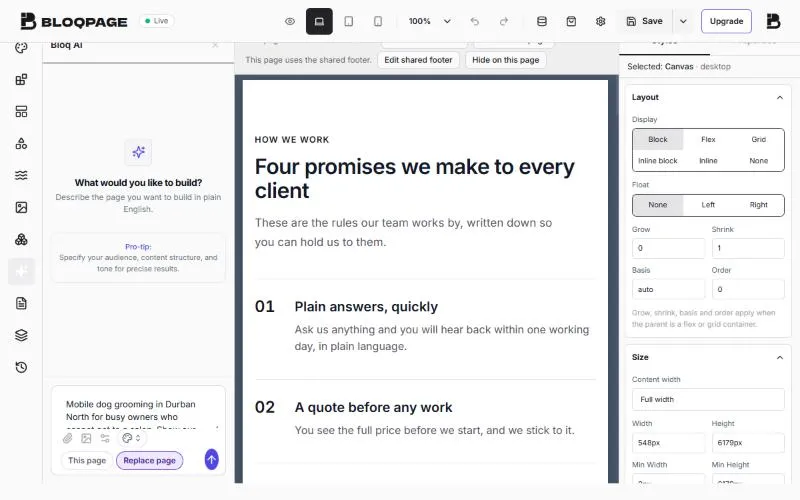 The Bloq AI panel in the Bloqpage builder with a short brief for a mobile dog grooming business typed in
What mistakes cost small businesses enquiries?
- No prices anywhere. Even a "from" price filters out bad fits and reassures good ones.
- The area is only in a picture or the logo. Write the suburbs and city in the text.
- Every page ends without a next step. End each page with the same main button.
- Stock photos of smiling strangers. Your own photos, even from a phone, build more trust.
- Old information. Wrong hours, a past special or a number that no longer works make people doubt the rest of the page.
- Writing for Google first. Repeating "plumber Pretoria plumber" reads badly and does not help. Write for the person, and put the search words in the headings and titles naturally.
A worked example
A made-up example: Pawfect Paws, a mobile dog groomer in Durban North, rewrote a one-page site that said "Welcome to Pawfect Paws, where your pet is family" and listed "Grooming services" with no prices.
The new home page:
- Headline: "Mobile dog grooming at your door in Durban North and Umhlanga"
- Under it: "Washes, cuts and nail trims in our fitted van, so your dog never sits in a salon cage. Most grooms take 90 minutes."
- Main button: "Book on WhatsApp"
- Services: Wash and tidy from R350, full groom from R550, nail trim R120, each with what is included
- Proof: three reviews with first names and suburbs, and six before and after photos
- How it works: message us, we confirm a time, we park outside and groom
- Contact: WhatsApp, phone, hours (Monday to Saturday, 08:00 to 17:00) and the suburbs covered
Same business, same photos. The difference is that a visitor now knows within five seconds what it is, where it works, roughly what it costs and how to book.
Common questions
How many words should a small business website have?
Enough to answer what customers ask, and no more. Most small business home pages land between 300 and 500 words, and each service needs a few short paragraphs.
Should I write it myself or use AI?
Use AI for the first draft and yourself for the facts. Bloq AI can draft every page from a short brief, as shown in our guide to building a business website with AI, but only you know your real prices, your area and what customers say about you. Replace every example number it writes with your own.
Do I need a blog?
Not at first. A blog helps once the main pages are done, if you can answer one real customer question a month. Bloqpage includes a blog from the Basic plan, and you can compare plans when you are ready for your own domain.
How often should I update my website?
Check prices, hours and photos every few months, and straight away when something changes. Add new reviews and work photos whenever you get them.